Lab.gruppen Amplifier
The Lab.gruppen amplifier is intended to be configured using the Device Import/Export docking window and the lab.gruppen editing software.
Initialization Dialog
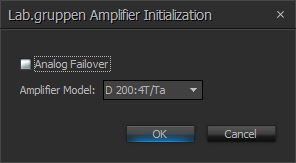
| Name | Description | Range |
| Analog Failover | Specifies if the analog inputs on the amplifier act as failover inputs | |
| Amplifier Model | Specifies the Amplifier model. | D 200:4T / Ta D 120:4T / Ta D 80:4T / Ta |
DSP Block Representation
The Lab.gruppen Amplifier block has 4 audio channels, one logic input and 5 logic outputs.
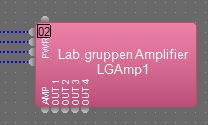
Logic In
PWR - Toggles between ON and STANDBY.
Logic Out
- AMP - The status of the amplifier frame
- OUT 1 - The Status of Amplifier Channel 1
- OUT 2 - The Status of Amplifier Channel 2
- OUT 3 - The Status of Amplifier Channel 3
- OUT 4 - The Status of Amplifier Channel 4
Associating analog inputs
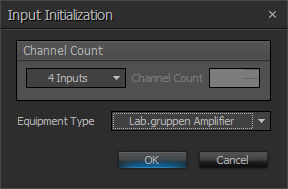
Add a Four channel Analog Input block and set the equipment type to Lab.Gruppen Amplifier. This will allow the analog audio from the amplifier to be streamed to a Tesira SERVER, Server IO or TesiraFORTÉ device for further processing.

Control Dialog
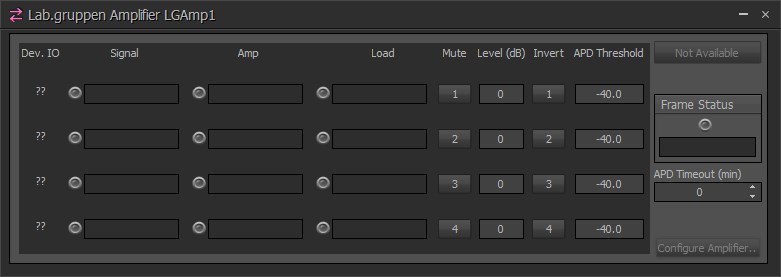
The main areas of the dialog indicates the channel and audio levels:

| Name | Description | Range |
| Device IO | Indicates which physical hardware input is associated with that software channel. | |
| Signal | Signal present LED based on threshold | |
| Amp | Displays the amplifier channel status | |
| Load | Displays the amplifier Load status and value. | |
| Mute | turns the input signal on/off. | On or Off |
| Level | adjusts the relative input volume. | -100 to +12 |
| Invert | adjusts the polarity of the input signal. | 0° or 180° |
| APD Threshold | If all the incoming signals are below their threshold for the specified length of time, the amplifier will power down. | -100 to 0 Default -40 |
| Failover | A Test Button to force a Failover from the AVB network audio to the local analog input. (Ta Model Only) |
The right side of the dialog indicates the device availability and other amplifier settings:
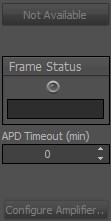
| Name | Description | Range |
| Availability | Displays the current availability of the device when online | NOT AVAILABLE, STANDBY, ON |
| Frame Status | Will indicate the amplifier status | Green, Yellow, Red |
| APD Timeout | If all the incoming signals are below their threshold for the specified length of time, the amplifier will power down. | 0 = disabled 1-60 minutes |
| Failover Inputs | available on the Lab.gruppen Ta version. Will open the Failover Input Dialog | |
| Configure Amplifier | Opens the Lab.gruppen Cafe software for additional amplifier configuration (Telnet must be enabled for Lab.gruppen Cafe software to work.) |
Failover Input dialog
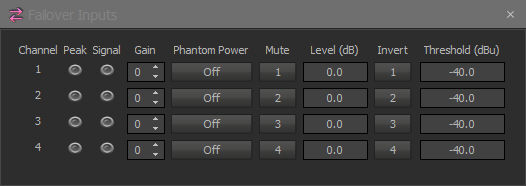
| Name | Description | Range |
| Channel | ||
| Peak | a software indicator that flashes when the input signal is within 3dB of clipping. | |
| Signal | Signal present LED based on threshold | |
| Gain | sets the amount of analog gain for that channel and is used to compensate for differing input levels (mic or line). | 0-66 in 6dB steps |
| Phantom Power | assigns +48 Volt phantom power to the input for use with condenser microphones | |
| Mute | turns the input signal on/off. | On or Off |
| Level | adjusts the relative input volume. | -100 to +12 |
| Invert | adjusts the polarity of the input signal. | 0° or 180° |
| Threshold | Level reference for signal present meter. Default -40. | -64 to 30 dBu |